Understanding Firewalls
Firewalls are your first line of defense online. Learn how they work, the difference between local, router, and dedicated hardware firewalls, and why inbound and outbound rules are key to protecting your privacy and security.
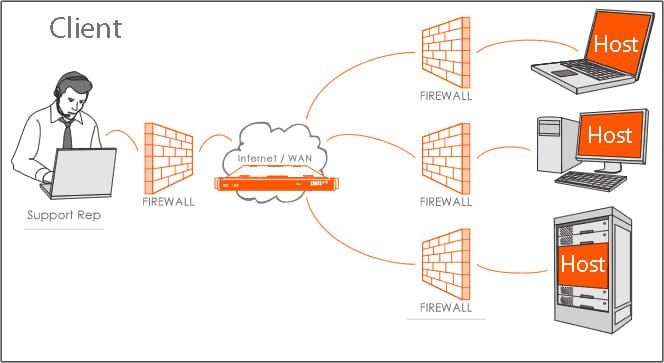
In the world of digital privacy and cybersecurity, few tools are as fundamental — or as misunderstood — as the firewall. Whether you’re protecting a single laptop or an entire network, a firewall serves as a digital gatekeeper, monitoring and controlling the flow of data to keep unwanted traffic out and your private information in.
Prefer listening? Hit play below to hear this post come to life!
Powered by RedCircle
What Is a Firewall?
A firewall is a system — either software-based, hardware-based, or a combination of both — that manages the traffic entering and leaving a computer or network. Its purpose is simple: to block unauthorized access while allowing legitimate communication to pass through.
You can think of it as a security guard stationed at every doorway of your network. Each packet of data (tiny units of information) is checked against a set of rules before it’s allowed in or out. If the data doesn’t meet the conditions — for example, it comes from an unknown source or targets a restricted port — it’s denied.
How Firewalls Work
Firewalls function by inspecting data packets and comparing them to predefined rules or policies. These rules determine which types of connections are permitted or denied based on factors like:
- Source and destination IP addresses
- The type of network protocol (e.g., HTTP, HTTPS, FTP)
- Port numbers (which indicate specific services)
- The direction of traffic (inbound vs. outbound)
When a connection attempt is made, the firewall applies these rules in sequence.
If a match is found, the firewall takes an action — usually allow, block, or log.
Modern firewalls can do much more (like deep-packet inspection or application awareness), but even a basic setup offers powerful protection for everyday users.
Types of Firewalls You Can Use
Firewalls exist at several layers of your digital environment — from the device you’re reading this on to the router connecting your entire home. Let’s break down the most common types.
1. Local Firewall (on Your Computer)
A local firewall, also known as a host-based firewall, runs directly on your computer or device.
Examples:
- Windows Defender Firewall (built into Windows)
- macOS Firewall
- Linux firewall tools (UFW, nftables)
These tools monitor all incoming and outgoing connections to and from your device.
For example, they can prevent unknown programs from connecting to the internet or block remote systems from attempting to access your files.
Best for:
Individual users who want basic control over their device’s connections.
Privacy tip:
You can often configure app-level permissions — for instance, allowing your web browser online access but blocking telemetry or background sync apps.
2. Router Firewall (Network-Level Protection)
Most home and office routers come with a built-in network firewall that filters traffic before it even reaches your individual devices.
Because it operates at the network’s edge, this type of firewall can protect multiple devices at once. You can typically configure rules in your router’s admin panel, such as:
- Blocking all unsolicited inbound connections
- Allowing only specific ports for remote access
- Creating guest networks that isolate devices from your main network
Best for:
Home users, small businesses, or anyone managing multiple connected devices.
Privacy tip:
Routers with advanced firmware (like OpenWRT, pfSense, or OPNsense) give you much more granular control over network traffic — without needing enterprise equipment.
3. Dedicated Physical Firewalls
For higher security needs, there are dedicated hardware firewalls — standalone devices designed specifically for filtering and controlling network traffic.
Examples: SonicWall, Fortinet, Cisco ASA, and Ubiquiti’s UniFi Security Gateway.
These physical firewalls sit between your modem and router (or directly between networks) and are capable of handling large volumes of data with more customization options. They’re common in offices, data centers, and increasingly in advanced home setups.
Advantages:
- Stronger performance and reliability
- Centralized control for multiple networks or users
- Advanced policy management
Best for:
Businesses, professionals, and privacy-conscious users who want total control over what enters and leaves their network.
Inbound vs. Outbound Policies
A crucial part of firewall configuration is understanding the difference between inbound and outbound traffic — and setting appropriate rules for both.
- Inbound traffic is data coming into your network or device (for example, when someone tries to connect to your computer from the internet).
- Inbound rules typically block unknown or unsolicited connections to prevent external attacks or unauthorized access.
- Outbound traffic is data going out from your device to the internet (for example, when your app connects to a remote server).
- Outbound rules control what your apps are allowed to send. This is where privacy-minded users can stop unnecessary telemetry, background syncing, or unauthorized data collection.
While most consumer firewalls focus on inbound filtering by default, outbound monitoring is increasingly important — especially as more apps and devices “phone home” in the background.
Why Firewalls Matter for Privacy
Firewalls aren’t just about stopping hackers — they’re about controlling information flow.
A well-configured firewall can:
- Prevent external probing or port scanning
- Stop malware from calling back to its command server
- Keep your smart home devices from sharing data without permission
- Block tracking or telemetry requests you don’t consent to
They provide visibility and control — two pillars of digital privacy.
Getting Started
If you’re just starting out:
- Enable your system firewall (Windows, macOS, or Linux).
- Check your router’s firewall settings — most have them turned on by default, but it’s worth confirming.
- Consider a hardware firewall if you manage a home office, business network, or want a dedicated privacy layer.
- Periodically review your firewall logs to understand what’s being blocked and why.
You don’t need enterprise hardware to gain solid protection — even built-in tools can go a long way when properly configured.
The Bottom Line
A firewall is your first and most consistent layer of defense.
It quietly guards your devices and networks from unwanted connections, keeping your personal information safer and your digital environment under your control.
Like a lock on your front door, it’s not flashy — but you’ll be glad it’s there.
*This article was written or edited with the assistance of AI tools and reviewed by a human editor before publication.


